


Saturday, February 12, 2005
 ok.. some ppl hav emailed me and asked abt pictures hosting and mp3 hosting.. for pictures hosting, which u usually need if u download skins from blogskins.. becuz the person who made the layout usually wud ask u to host the pictures urself.. otherwise the bandwidth can get too large and den his or her account will be frozen.. and den u wun get ur picture in ur website...
to host pictures.. create a new account at photobucket.. go to this website^^.. and den u'll see...
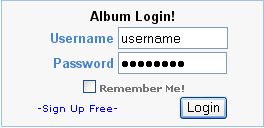
click on the -Sign Up Free- and den u'll come to this site where there is the account comparison blah blah thing... scroll down where u see this:
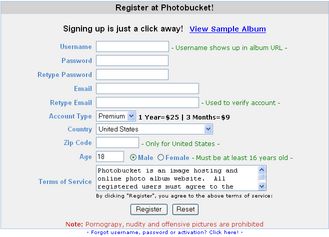
remember to choose the account type as Free ya.. den juz type in ur particulars.. after which they will send u an email asking u to verify ur account.. and den it's done already =)
Photobucket is very easy to use.. there'll be a file upload place on top for u to upload ur pictures.. and when ur pics are uploaded there'll be its URL below.. example of such..
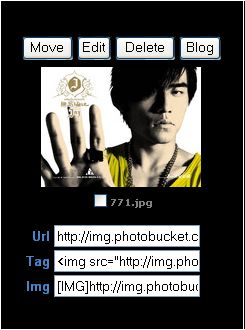
u can ignore the move button becuz it's for u if u hav a few folders.. doesnt realli matter anyway lar.. i onli use one folder -_- the edit button does nth much oso becuz it mainly helps u do some things to the pic like rotating it, make it brighter dimmer blah blah.. the delete button is of cuz for u if u wan to delete the picture.. the blog button is for livejournal users who can blog abt tht picture in their livejournals..
the name of the picture is below the picture.. like for example, the name of tht jay chou pic^^ is 771.jpg.. and den below there are three boxes which are very useful.. the Url is like if i copy and paste the Url in ur blog entry.. u'll get a link to the picture.. like this:
http://img.photobucket.com/albums/v298/lonehearter/pic4.bmp
clicking on it will open a new browser linking to ur picture.. if u wan to add pictures in ur blog entries.. u use the second or third box which helps u insert pictures into ur blog immediately.. juz copy and paste the code here and your picture will appear.. like this:

u can then resize your pictures in the post becuz blogger allows u to do so =) both the second and the third box has the same function as both works for blogger.. some other blogging services may onli allow the third type.. =)
alright.. i'm done wif picture hosting..
as for mp3 hosting.. u can use Angelfire becuz it allows you to own a 20MB account.. it's very very large for a free account le.. and Angelfire seems to be the onli one which allows such a large bandwidth.. so dun overuse it otherwise your account will become frozen and none of the images or mp3 links will work =)
first.. go to tht site.. sign up for a new account.. the sign up button is at the top of the page.. you'll reach a membership plan site... choose the angelfire free and click sign up becuz of its wide popularity.. it requires you to hav 2 parts to your username.. which u hav to remember..
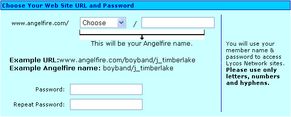
the "Choose" part is the first part of ur username.. choose one of them.. preferbably sumthing which u can easily remember.. and then after the slash u type in ur username tht u wan to use.. for me, i chose rings and typed in lonehearter.. thus, my username is rings/lonehearter remember the slash becuz if u dun type in tht when u sign in, er, it wun work -_-
and den type in ur particulars ur passwords.. ur particulars.. and den click I agree.. after tht they will send you an email verification again.. which u wud den verify your account and your account will be ready for use..
to use, first log in the button is beside the sign up button.. remember to include both parts of ur username wif the slash.. and den key in your password and log in..
on the left navi bar..
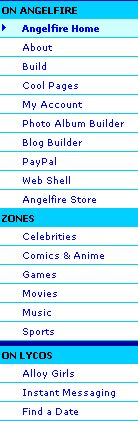
click on Web Shell.. you'll den reach a page showing the amt of diskspace you hav left on your account.. scroll down to the File Upload part
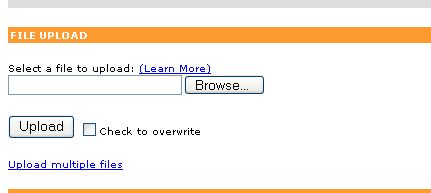
forget abt the Transloader part becuz it dun work -_-.. ok.. den upload your files.. the mp3 files you upload hav to be downloaded from the net.. if it comes from a CD it wun work.. i noe becuz i've tried.. so ONLI upload mp3 files you downloaded, not copied from a real CD..
it will take abt 2 mins to upload a normal mp3 file.. after you're done.. you'll see your file under the webshell column.. and den you can get your own file name like this.. for example.. i uploaded a mp3 file named "jay - jian dan ai" therefore your URL will be:

every space in your file name will be replaced by an underscore.. the front part will be the address of angelfire.. slash your username.. den slash the file name.. rmb to include the .mp3 at the back.. i noe it's hard to rmb.. so try to rename your mp3 files to simpler file names before uploading.. =)
although 20MB is a very big space.. it is onli enuff for a few songs lar.. but you cant complain since it's free.. and it's very useful already.. cuz iwebmusic has very lousy songs quality.. plus it has virus.. plus all the pop-ups.. 20MB allows u to upload to 4 songs a time.. which means you muz delete old songs if u wan upload new ones.. but it's easy to use =) and it's free =)
i hope er.. this is clear? =)
as for the two emails i received asking how to make layouts.. er.. shall explain next time.. hahaz.. tired liaoZ.. *yawns*
choZ
MG :) wrote on
11:31.

